Internet and WiFi Services
Modern homes and businesses rely on fast, stable connectivity to function every day. Internet and WiFi services play a key role in how people work, stream, communicate, and manage smart devices. This blog explains how professionally installed internet and WiFi systems support modern living by improving speed, coverage, and reliability. It highlights common connectivity problems, the value of expert setup, and how local technicians help homes and businesses stay connected. If you want fewer dropouts, stronger signals, and a network that supports today’s digital lifestyle, this guide explains what truly matters.
Living Today Requires Reliable Internet and WiFi

Modern living depends on constant connectivity. From video meetings and online learning to streaming, gaming, and smart home systems, stable internet access is no longer optional. Many households and businesses struggle with slow speeds, dead zones, and frequent dropouts because their network was not designed for current demands.
Professional internet and WiFi services help close this gap by creating networks that support multiple devices, higher data use, and consistent performance. A well-planned setup improves daily life by reducing frustration and improving how technology works together across the home or workplace.
Why Basic WiFi Setups Often Fall Short
Most internet problems do not come solely from the provider. They often result from poor router placement, outdated equipment, or networks that were never designed for large spaces or heavy use. Homes today may run dozens of connected devices simultaneously, placing strain on basic systems.
Professional WiFi installation addresses these challenges by designing coverage based on layout, building materials, and usage habits. This approach improves signal flow and eliminates weak spots that cause buffering or slow connections.
Home Internet Built Around Real Usage
Every home uses the internet differently. Families stream content in multiple rooms, work remotely, attend virtual classes, and use smart devices daily. A robust home WiFi setup meets all these needs without slowing down during peak usage.
Local technicians assess how your household uses the internet and adjust the setup accordingly. Solutions may include better router placement, upgraded equipment, or mesh systems that evenly spread coverage. You can learn more about these solutions through professional WiFi installation services that are designed for modern homes.
Business Connectivity That Supports Productivity
Businesses rely on fast and stable networks to operate smoothly. Slow or unreliable connections can interrupt communication, payment systems, and cloud-based tools. Professional business WiFi installation provides secure and stable connectivity for staff, customers, and devices.
Office layouts, user numbers, and security needs all influence how a business network should be built. With expert planning, businesses gain better performance and fewer disruptions. For companies experiencing frequent connectivity issues, WiFi troubleshooting services help identify and resolve ongoing problems before they affect operations.
Mesh WiFi for Larger Spaces and Better Coverage
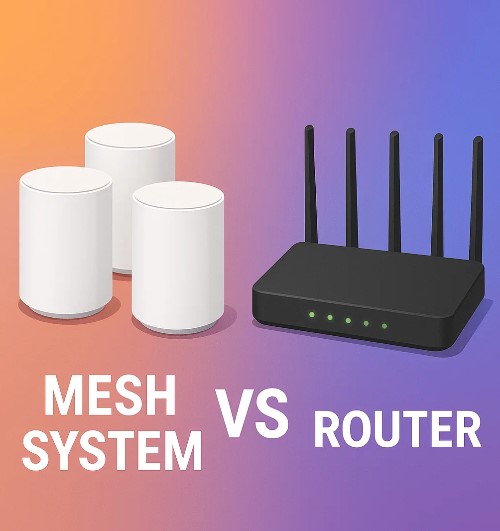
Larger homes, offices, and properties often struggle with consistent signal strength. Walls, floors, and distance can weaken WiFi signals quickly. Mesh WiFi installation solves this problem by using multiple access points that work together as one system.
This setup provides smooth coverage across all areas without forcing devices to switch networks. It is ideal for multi-story homes, offices, and properties with outdoor areas. If WiFi dropouts are common, learning how mesh WiFi systems improve coverage can help you choose the right solution.
The Value of Local Internet Technicians
Working with a local internet technician brings practical benefits. Local experts understand common connectivity issues in the Sunshine Coast region and can respond quickly when support is needed. On-site service allows technicians to test signal strength, adjust equipment, and confirm results in real time.
Unlike remote support, local technicians provide hands-on solutions and explain how your network works. This helps homeowners and businesses feel confident managing their systems after installation or repairs.
Building Networks for Long-Term Performance
Modern internet use will continue to grow as more devices and services rely on connectivity. Professional WiFi repair and installation focuses on long-term performance, not quick fixes. Systems are built to support future needs, reducing the need for frequent upgrades.
Helpful planning includes quality hardware, proper placement, and secure configurations. For those exploring upgrades, reviewing home WiFi improvement options can clarify what changes offer the best results.
Local Service Backed by Experience
Brocky’s Internet provides tailored internet and WiFi services for homes and businesses across Maroochydore and the Sunshine Coast. As part of the Brocky’s TV family, the company brings local experience, trusted service, and practical solutions designed for modern living. To learn more about available services or book support, visit Brocky’s Internet.
Frequently Asked Questions
1. Why is my WiFi slow, even with a good internet plan?
Slow WiFi often results from poor router placement, outdated equipment, or interference, not the internet plan itself. Professional assessment can identify and fix these issues.
2. What is the benefit of professional WiFi installation?
Professional installation creates better coverage, reduces dropouts, and supports multiple devices by designing the network around your space and usage needs.
3. Is mesh WiFi better than a single router?
Mesh WiFi is better for larger spaces because it spreads coverage evenly and removes dead zones that a single router cannot reach.
4. How often should WiFi equipment be upgraded?
Most equipment should be reviewed every 3–5 years, especially if usage increases or performance declines.
5. Can a local technician fix ongoing internet dropouts?
Yes. A local technician can test signal strength, identify interference, and adjust the setup to stabilize your connection.